
A practical guide, because one size definitely doesn’t fit all
You need a printer. You go online. And suddenly you’re drowning.
Inkjet or laser? Monochrome or colour? Single-function or multifunction? Print speed? Duty cycle? Monthly volume? Connectivity? Security? Energy efficiency?
It’s overwhelming. And the sales pages don’t help. Every printer is “the best.” Every model is “perfect for small business.”
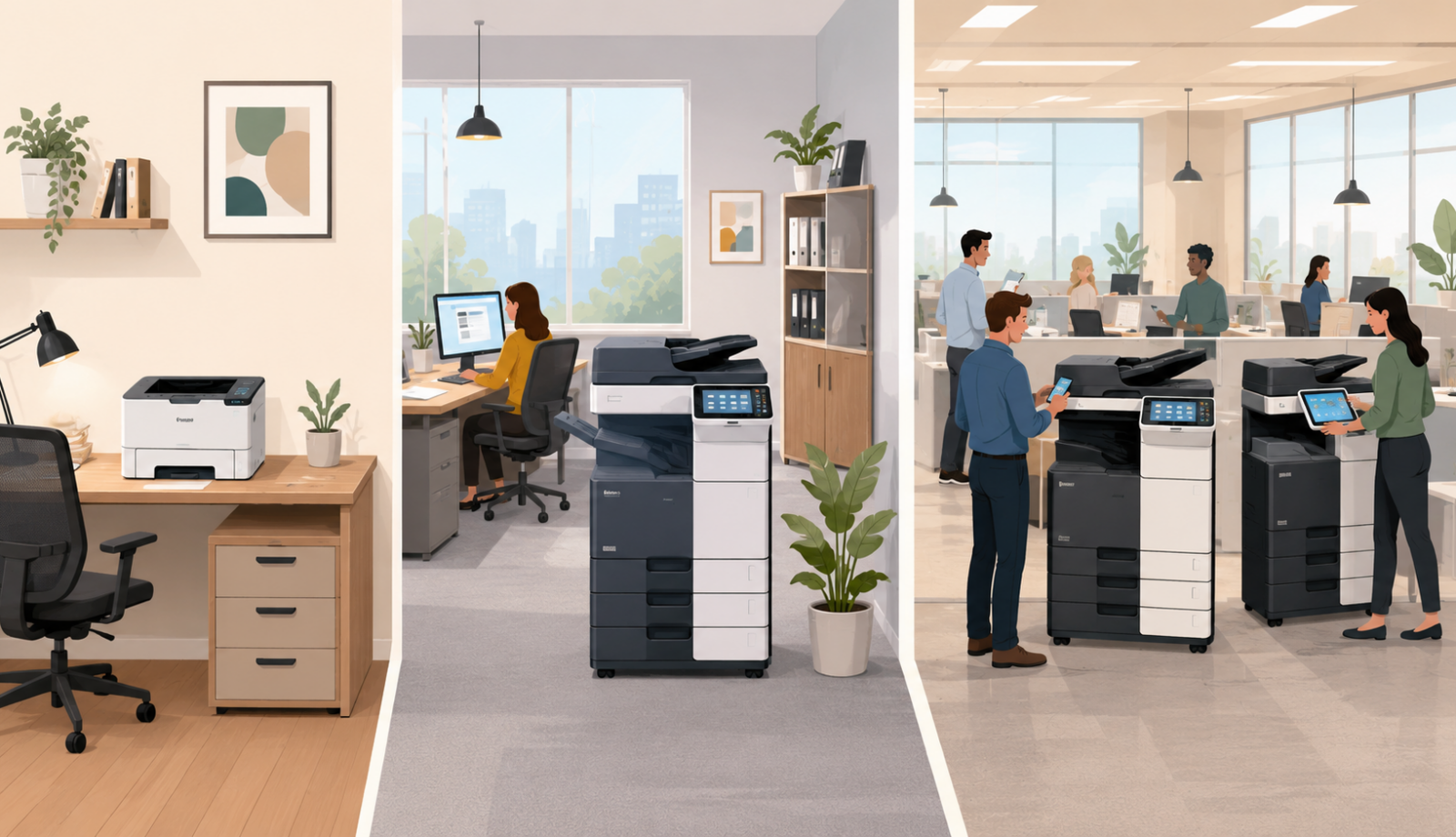
But here’s the truth: the right printer for a one-person home office is completely wrong for a 50-person growing company. And the workhorse that keeps a busy office running is massive overkill for a small team.
In this article, I’ll walk you through exactly how to choose the right printer for your business size. No jargon. No hard sell. Just honest, practical advice based on how many people you have and what you actually print.
Let’s dive in.
Part One: Why Business Size Matters
Before we get into specific recommendations, let’s talk about why the number of people in your office changes everything about printing.
What changes as you grow:
| Factor | Small (1-5 people) | Medium (6-20 people) | Large (21-50+ people) |
| Monthly print volume | 100-500 pages | 500-5,000 pages | 5,000-50,000+ pages |
| Speed needed | Slow is fine | Medium speed matters | Fast is essential |
| Reliability | Nice to have | Important | Critical |
| Features needed | Basic print | Print, copy, scan | All-in-one + finishing |
| Network connectivity | USB or basic Wi-Fi | Network required | Advanced network + cloud |
| Service contract | Pay as you go | Recommended | Essential |
| Number of devices | One | One or two | Multiple devices |
A printer that’s perfect for a small team will break under the workload of a larger office. And a printer built for high volume will be unnecessarily expensive for a small team.
Let’s go size by size.
Part Two: Small Business (1-5 People)
Typical profile:
- Home office or very small team
- You print documents, invoices, maybe occasional client materials
- Low monthly volume (under 500 pages)
- Budget is a primary concern
- Desk space is limited
What you need:
- Reliable but not industrial-strength
- Low running costs (toner/ink isn’t the main expense at this volume, but still matters)
- Small footprint
- Easy setup (you don’t have an IT person)
- Wireless printing (you don’t want cables everywhere)
Inkjet vs Laser at this size:
| Feature | Inkjet | Laser |
| Upfront cost | Lower (£50-150) | Higher (£150-300) |
| Print quality | Excellent for photos/graphics | Sharp text, good graphics |
| Speed | Slower (5-15 pages per minute) | Faster (15-25 pages per minute) |
| Running cost (per page) | Higher (ink is expensive) | Lower (toner lasts longer) |
| Best for | Low volume, mixed content | Low volume, mostly text |
Our recommendation:
For most small businesses, a monochrome laser printer is the sweet spot. The upfront cost is slightly higher than a cheap inkjet, but the running costs are much lower. You won’t be shocked by £30 ink cartridges every few months.
If you need colour occasionally: Consider a colour inkjet, but use it sparingly. Or outsource colour printing to a local print shop.
Top features to look for:
- Wireless printing (print from laptops and phones)
- Automatic duplex (double-sided printing saves paper)
- Reasonable toner yield (1,000+ pages per cartridge)
Avoid: The cheapest inkjet printers. The upfront price is tempting, but the ink costs will hurt you.
Example: A small consulting business with three people bought a cheap inkjet. Within a year, they’d spent more on ink than the printer cost. They switched to a monochrome laser. Two years later, they’re still on their second toner cartridge.
Part Three: Growing Business (6-20 People)
Typical profile:
- You have an office (not just a home)
- Multiple people need to print
- Monthly volume: 500-5,000 pages
- You need more than just printing (copying, scanning)
- Reliability matters
- You probably have someone who handles IT (even if it’s not their full-time job)
What you need:
- Multifunction device (print, copy, scan, fax optional)
- Network connectivity (everyone needs access)
- Faster print speed (20-35 pages per minute)
- Higher monthly duty cycle (5,000-20,000 pages)
- Scan-to-email and scan-to-folder
- Reasonable running costs (you’re printing enough that it matters)
Laser is the clear choice at this size. Inkjet cannot keep up with the volume or the need for speed.
Monochrome vs Colour:
| Feature | Monochrome | Colour |
| Upfront cost | Lower (£300-600) | Higher (£500-1,500) |
| Running cost | Lower (one toner) | Higher (four toners) |
| Best for | Most internal documents, forms, invoices | Client-facing materials, marketing, presentations |
Our recommendation:
If 90% of your printing is internal documents, forms, and invoices, go monochrome. It’s cheaper to buy and cheaper to run.
If you regularly print client-facing materials, presentations, or marketing collateral, colour is worth the investment.
Top features to look for:
- Network ready (Ethernet, not just Wi-Fi)
- Scan-to-email (works reliably with your email system)
- Scan-to-folder (saves to your network)
- Automatic document feeder (scan multi-page documents without lifting a finger)
- Duplex (double-sided) printing and copying
- Replaceable maintenance kit (rollers, pads), not just toner
What to avoid: A single-function printer (print only). At this size, you need copy and scan functionality. A cheap consumer model won’t last.
Example: A small accountancy firm with 10 people bought a basic monochrome laser printer. It worked fine for printing, but they still had a separate copier and scanner. They upgraded to a single multifunction device. One machine replaced three. Less space, less maintenance, happier team.
Part Four: Midsize to Large Business (21-50+ People)
Typical profile:
- Busy office with multiple departments
- Monthly volume: 5,000-50,000+ pages
- Speed and reliability are critical
- You have multiple devices (or should)
- You probably have an IT person or external IT support
- Print management and cost control matter
What you need:
- Business-grade multifunction devices
- Fast print speeds (35-60+ pages per minute)
- High monthly duty cycle (30,000-200,000 pages)
- Advanced features (stapling, hole punching, booklet making)
- Robust security features
- Network management capabilities
- Professional service contract (you cannot afford downtime)
At this size, you’re likely looking at floor-standing copiers (not desktop printers). These are serious machines built for serious volume.
One device or multiple?
| Approach | Pros | Cons |
| One large central device | Lower cost, easier to manage | Creates queues, single point of failure |
| Multiple distributed devices | Less walking, redundancy | Higher cost, more to manage |
| Follow-me printing (cloud) | Print anywhere, release anywhere | Requires more setup, ongoing cost |
Our recommendation:
For most offices of this size, two or three mid-sized devices work better than one giant one. Put one on each floor or in each wing. Add follow-me printing so people can send to one queue and release at the nearest machine.
Top features to look for:
- Print speed (35+ pages per minute)
- Duty cycle (at least 3x your monthly volume)
- Paper capacity (at least 2-3 trays, 1,000+ sheets)
- Finishing options (stapling, hole punching, booklet making)
- Security (user authentication, hard drive encryption, secure print release)
- Remote management (your IT team can monitor and manage)
- Cloud connectivity (print from anywhere)
Service contract is essential. At this size, downtime costs real money. You need guaranteed response times and proactive maintenance.
Example: A professional services firm with 40 people had one large copier. Everyone queued. Frustration was high. They added two smaller devices on different floors and implemented follow-me printing. Queues disappeared. Walk times dropped. The office manager estimated they saved 10+ person-hours per week.
Part Five: Special Considerations
Beyond size, there are other factors that might change your decision.
Remote and Hybrid Teams
If your team works from home, cloud printing becomes important. Look for printers that support:
- Mobile printing (print from phones and tablets)
- Cloud connectivity (print from anywhere)
- Secure release (print doesn’t come out until you’re at the machine)
Industry-Specific Needs
Legal and finance:
- Security features are critical (encryption, user authentication, secure print)
- Archival-quality output
- High-volume scanning
Creative and marketing:
- Colour accuracy matters
- Wide range of paper types and sizes
- High-quality photo and graphics printing
Healthcare:
- Security and compliance are non-negotiable
- Easy-to-clean surfaces
- Reliable scan-to-email for patient records
Retail and hospitality:
- Receipt printing (specialised printers)
- Durability (high-traffic environments)
- Compact size (counter space is valuable)
Managed Print Services
At a certain size (typically 10+ people), managing your own printers becomes a distraction. Managed print services (MPS) are worth considering.
What MPS includes:
- Equipment (leased, not bought)
- All toner and consumables
- All service and maintenance
- Usage reporting and optimisation
- Often, a single price per page
MPS makes sense when:
- You don’t want to think about printers
- You want predictable monthly costs
- You have more than 5-10 people
- You don’t have dedicated IT support for printing
Part Six: The One-Page Decision Tool
Use this flowchart (or checklist) to guide your decision.
Step 1: How many people?
- 1-5 people → Go to Step 2A
- 6-20 people → Go to Step 2B
- 21-50+ people → Go to Step 2C
Step 2A: Small business (1-5 people)
- Mostly text documents? → Monochrome laser (desktop)
- Need colour occasionally? → Colour inkjet OR monochrome laser + outsource colour
- Very low budget? → Basic monochrome laser (avoid cheapest inkjets)
Recommended spend: £150-300
Step 2B: Growing business (6-20 people)
- Mostly internal documents? → Monochrome multifunction laser (desktop or floor-standing)
- Client-facing materials? → Colour multifunction laser
- Need copy and scan? → Must be multifunction (print, copy, scan)
Recommended spend: £500-1,500
Step 2C: Midsize to large (21-50+ people)
- Single department/small office? → One business-grade multifunction device
- Multiple floors/areas? → 2-3 devices + follow-me printing
- Need finishing (staple, hole punch)? → Yes, look for finishing options
Recommended spend: £2,000-6,000+ (lease, not buy)
Step 3: Consider special factors
- Remote/hybrid team? → Need mobile and cloud printing
- Security-sensitive industry? → Need encryption, authentication, secure print
- Colour-critical work? → Need colour accuracy, wide gamut range
- High-volume scanning? → Need fast ADF, scan-to-cloud
Step 4: Choose your buying model
- 1-5 people: Buy outright (own it)
- 6-20 people: Buy or lease (compare total cost)
- 21-50+ people: Buy or Lease with managed service contract
Part Seven: Examples
Here are a few examples of businesses that chose the right printer for their size.
Example 1: The Solo Consultant
A one-person consulting business printed client reports, invoices, and the occasional contract. Maybe 100 pages per month.
They bought a cheap inkjet printer. Within six months, they’d spent £100 on ink for a £50 printer.
The fix: They switched to a monochrome laser printer for £150. The starter toner lasted 18 months. Replacement toner cost £40 and lasted another 18 months.
The lesson: For low volume but regular printing, laser is cheaper in the long run.
Example 2: The 15-Person Agency
A creative agency with 15 people needed colour printing for client presentations and marketing materials. They also needed scanning and copying.
They bought a colour multifunction laser printer. It handled print, copy, scan, and even stapling. One machine replaced three old devices.
The result: Less clutter. Less maintenance. Happier team. And the quality of client-facing materials improved noticeably.
The lesson: At this size, a single good multifunction device is usually the right answer.
Example 3: The 50-Person Firm
A professional services firm with 50 people across two floors had four old, slow printers. Each used different toner. Staff were constantly frustrated.
They installed two new business-grade multifunction devices (one on each floor) plus follow-me printing. Staff could send to one queue and release at whichever machine was nearest.
The result: Queues disappeared. Walk times dropped. The IT manager estimated they saved 15+ hours per month on printer-related issues.
The lesson: At this size, multiple devices plus follow-me printing transforms the experience.
Part Eight: Common Mistakes to Avoid
Mistake 1: Buying Consumer-Grade for Business Use
That £50 printer from the electronics store is not designed for office use. It will break. It will be slow. It will frustrate your team.
The fix: Buy business-grade equipment, even for small offices. It costs more upfront but lasts longer and works better.
Mistake 2: Focusing Only on Upfront Price
A cheap printer with expensive toner costs more than a moderately priced printer with cheap toner.
The fix: Calculate total cost of ownership over 3 years (upfront + toner + service).
Mistake 3: Ignoring Your Team’s Needs
The quietest person in the office might be the one who prints the most. If you don’t ask, you won’t know.
The fix: Talk to your team before buying. What frustrates them? What would help?
Mistake 4: Buying Too Much (or Too Little) Machine
A high-volume copier for a small office is wasted money. A desktop printer for a busy office will break under the load.
The fix: Match the machine’s duty cycle to your actual volume.
Mistake 5: No Service Plan
Even the best printers break. Without a service plan, you’re waiting days for repairs.
The fix: For any printer used by more than a few people, get a service contract.
Final Thoughts
Choosing the right printer for your business size isn’t complicated. It’s about matching your needs to the right category of machine.
- 1-5 people: Monochrome laser desktop printer.
- 6-20 people: Multifunction laser (monochrome or colour).
- 21-50+ people: Business-grade multifunction devices (likely multiple units) with follow-me printing and a service contract.
Start with how many people you have. Then consider your volume, your need for colour, and any special requirements (security, hybrid working, finishing).
And if you’d like a friendly, no-pressure chat about choosing the right printer for your business, whether that’s a recommendation, a quote, or just honest advice, just reach out.
We’re independent. We’re here to help. And we won’t sell you things you don’t need.